In need of two-way authentication to extend the security in your corporation for accessing heavily secured information outside the company walls? You can easily manage this by setting up a two-way authentication with ProVide.
You can set up two-way authentication in many ways, one way can be that the user who tries to access ProVide resources has to exist in an external database or perhaps the user also need to provide extra credentials via SMS. ProVide supports internal and external parameterized scripting and can also be controlled via the built in API. Of course, if your client supports the proper authentication exchange ProVide is able to encrypt the API connection using a regular “AUTH TLS” command (used frequently in for instance FTPS connections).
What we are basically saying is that if you want to enable 2-way authentication this is possible by any means that you prefer; be it SMS, e-mails, or a combination of external logon systems.
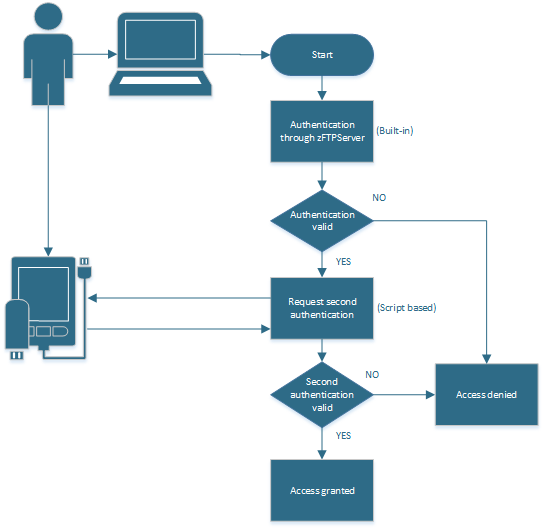
Sample scripts for enabling two factor authentication according to the diagram below can be found in the guides. Should you require assistance in setting up and enabling two factor authentication please contact us and we can assist in script delelopment, integration or even custom development.